cfzt
One command to expose any local service through Cloudflare Zero Trust

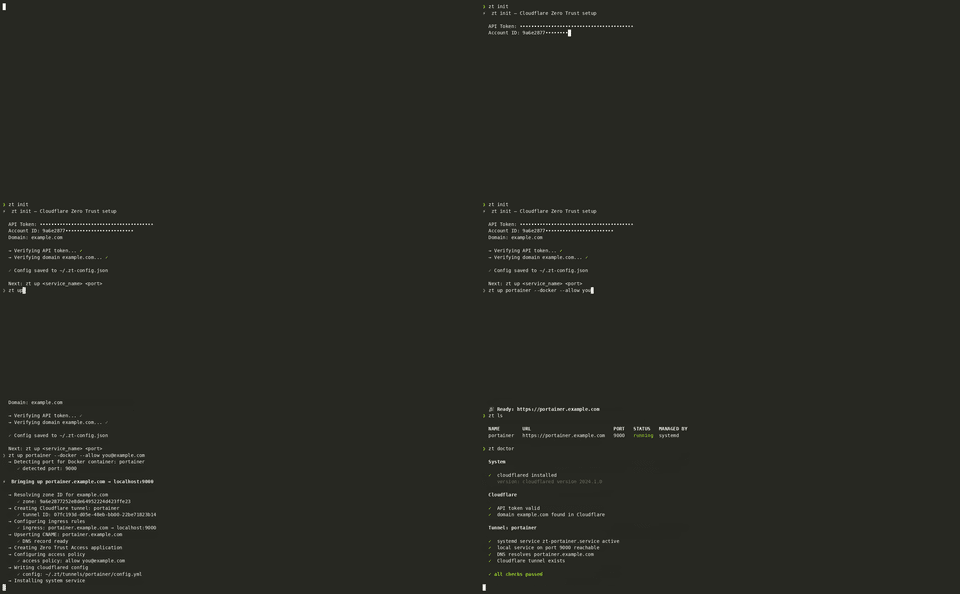
zt up grafana 3000 — that’s it. cfzt handles the rest: creates a Cloudflare Tunnel,
configures ingress rules, upserts a CNAME DNS record, sets up a Zero Trust Access
application with an email allowlist, and installs a systemd service that survives reboots.
zt down grafana tears everything back down cleanly.
Built out of frustration with manually clicking through the Cloudflare dashboard every
time a new homelab service needed exposing. Now the same setup that used to take 15
minutes of dashboard navigation takes 15 seconds. Works with Docker port auto-detection,
supports QUIC and HTTP/2 protocols, and comes with zt export / zt apply for
backing up your tunnel config and restoring it on a new machine from a single YAML file.
One command magic to instantly expose your local services through Cloudflare Zero Trust, turning complex setups into a breeze with secure, custom domains—perfect for showing off your projects safely and effortlessly!
Key features:
- 🚀 Auto-creates Cloudflare Tunnel and DNS records
- 🔒 Sets up Zero Trust Access apps with policies
- 🛠️ Installs system services for persistent tunnels
- 🔄 Supports Docker auto-port detection and flexible access controls
This summary was generated by GitHub Copilot based on the project README.