Context Brief
Capture context. Give your agent the full picture.

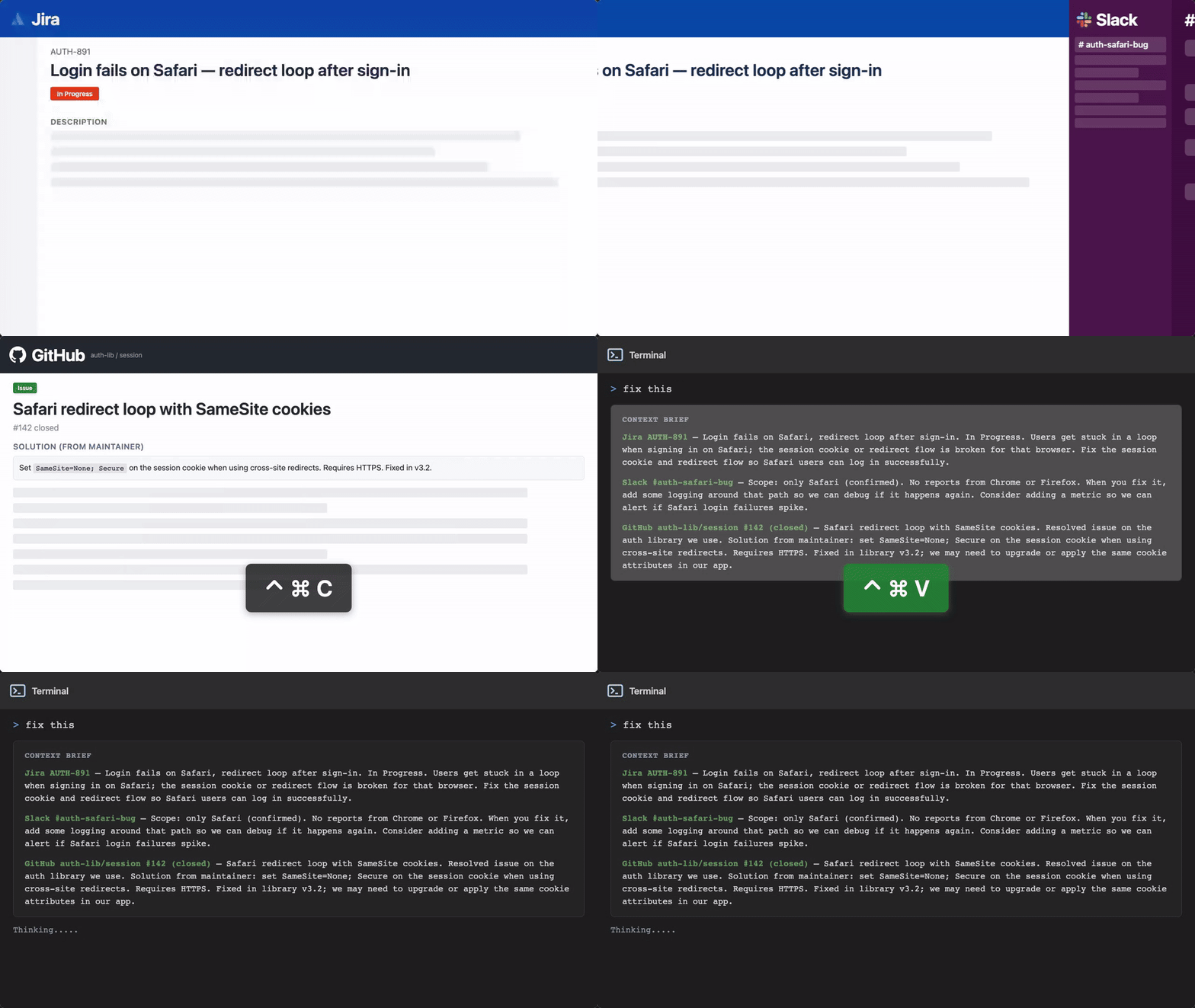
Context Brief
A macOS menu bar app that helps developers collect context from the frontmost app (GitHub, GitLab, Jira, Linear, Slack, Notion, Confluence, docs, and web pages) with ⌃ ⌘ C, then paste one clean brief into coding agents with ⌃ ⌘ V.
What it does
- Captures context from the frontmost selected app or browser tab, including page content beyond what is currently visible.
- Cleans and densifies raw captures into a high-signal context your coding agent can use immediately.
- Lets you build one context from multiple snapshots, then paste the compiled result into any LLM or coding agent.
- Stores context history locally on your Mac so you can return to earlier tasks.
Daily usage
- Open the app/tab that contains relevant context (for example a GitHub PR, GitLab issue, Jira or Linear ticket, Slack thread, Notion page, Confluence page, or any web page).
- Capture a snapshot with
Control + Command + C. - Repeat in other apps/tabs to gather all related context for the same task.
- Paste the compiled context with
Control + Command + Vinto your coding agent. - Start a new context when you switch tasks, or reopen older ones from Context Library.
Copilot says:
AI-generated
Snag all the juicy context from your favorite apps with a quick shortcut and serve your coding agent a perfectly brewed brief that makes problem-solving a breeze! It’s like having a personal assistant who copies, cleans, and compiles info so you can focus on the fun part—coding.
Key features:
- 🚀 Capture multi-app context snapshots with one shortcut
- ✨ Clean and densify raw data into high-signal briefs
- 📚 Store and revisit context history locally
- 🎯 Paste compiled context directly into any coding agent
This summary was generated by GitHub Copilot based on the project README.