lazywslcontainer
Lazydocker-inspired TUI for WSL containers (wslc.exe) — manage containers, images, logs, and ASCII-graphed stats in one keypress

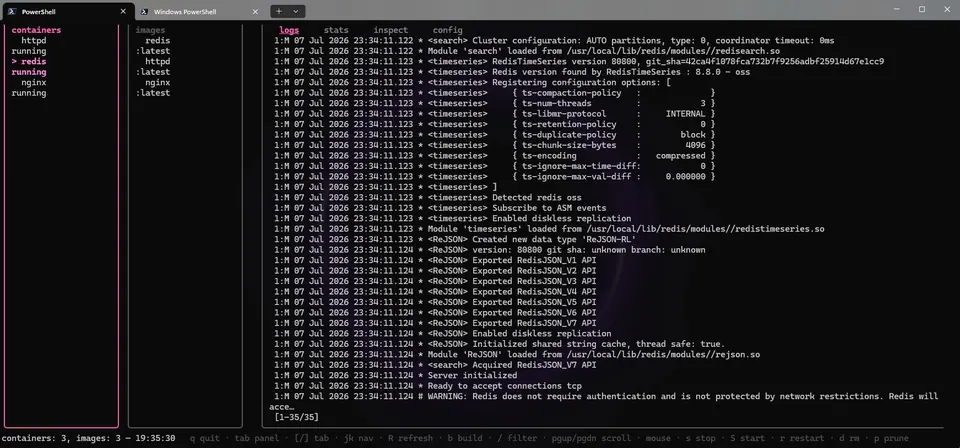
A terminal UI for wslc.exe, the Docker-like CLI built into WSL on Windows. It puts everything one keypress away in a single TUI: list/stop/start/restart/remove containers, run/build images with inline argument prompts, tail logs, inspect JSON (pretty-printed), and live stats rendered as multi-row ASCII sparklines for CPU% and memory.
Why I built it: I kept forgetting wslc flags and jumping between terminal windows. lazydocker spoiled me for Docker — I wanted the same laziness for WSL containers.
What’s delightful: the stats tab. Each container gets a 3-row sparkline (▁▂▃▄▅▆▇█) with 60 samples of CPU (cyan, 0-100%) and memory (magenta), with min/max/cur labels — all in pure terminal, no browser, no Electron. Also: mouse support, / filter, confirm prompts for destructive actions, and scrollable pretty-printed JSON inspect.
Wave goodbye to juggling multiple terminals and say hello to a slick one-keypress TUI that lets you manage WSL containers, images, logs, and stats all in one cozy, lazydocker-inspired interface!
Key features:
- 🐳 Manage containers with start, stop, logs, and prune
- 📊 View CPU and memory stats with colorful ASCII sparklines
- 🔍 Filter and inspect containers and images with pretty-printed JSON
- 🖱️ Mouse support for clicks and scrolling inside the terminal UI
This summary was generated by GitHub Copilot based on the project README.