MultiTerm Workbench
A Windows terminal workspace for people who run many shells at once — PowerShell, Command Prompt, and WSL together, with broadcast input, cross-terminal search, and layouts from auto-fit grids to a free-form canvas.

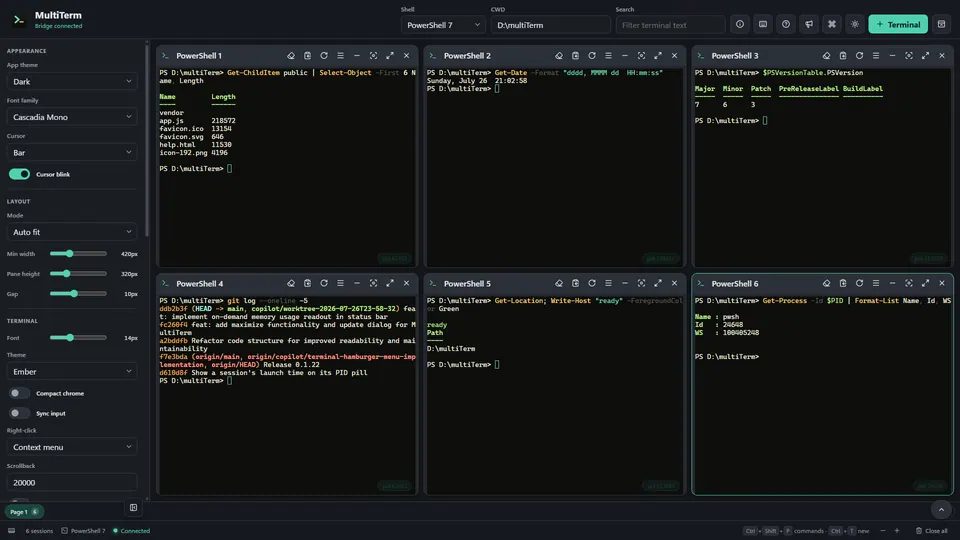
MultiTerm Workbench is a Windows terminal workspace built for running many shells at the same time rather than switching between tabs. PowerShell, Command Prompt, and WSL sessions run as real PTYs in a single window, arranged through layouts ranging from auto-fit grids and focus rails to spotlight, bento, and a free-form canvas you drag and resize yourself. Because every session stays visible, you can act on all of them together: broadcast a command to every terminal or a chosen scope, mirror your keystrokes across panes, and search one pane or all of them at once. Each shell also carries its own working context — notes and a command queue bound to the process, per-terminal statistics, and recovered notes when a process exits — alongside saved snippets, named workspace layouts, a keyboard-first command palette, live diagnostics, and the ability to attach existing WSL tmux sessions without disturbing the work already running inside them.