PortBuster
Global hotkey overlay to find and kill processes by port number (WinUI 3, Windows 11)

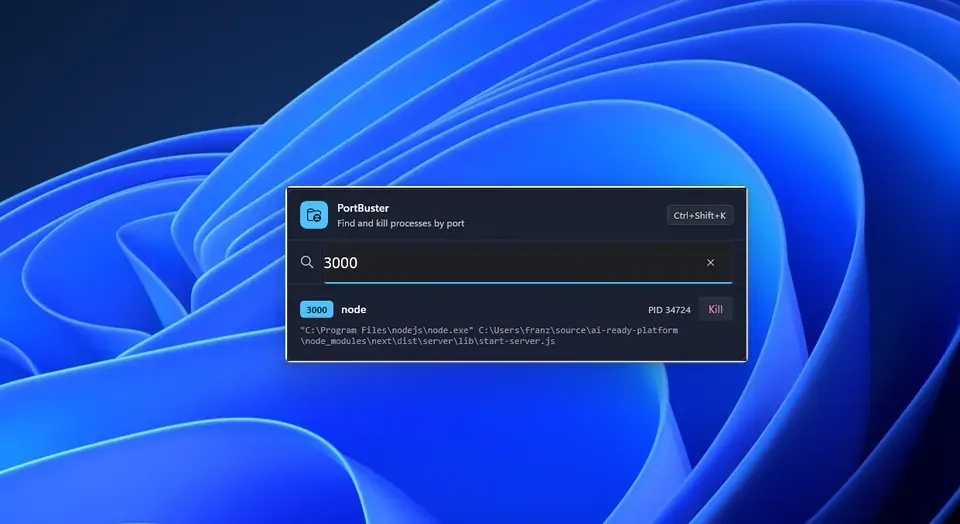
PortBuster sits in the system tray and does one thing: tells you what’s on a port and lets you kill it.
Press Ctrl+Shift+K from anywhere, type a port number, and you’ll see the process name, PID, and full command line. Press Enter to kill it, or use the Kill button on individual rows. The window closes itself when you’re done.
Uses GetExtendedTcpTable (iphlpapi.dll) directly instead of parsing netstat output. Built as a first native WinUI 3 app using the WinUI Agent Plugin for GitHub Copilot.
Say goodbye to port conflicts with a quick Ctrl+Shift+K! Instantly find and kill pesky processes hogging your ports without breaking your flow or opening a terminal—just type the port and zap away like a keyboard ninja.
Key features:
- 🔍 Instant port lookup with process details
- ⚡ One-keystroke kill to stop troublemakers
- 🪟 Sleek Fluent Design overlay floats above your work
- ⌨️ Global hotkey works from anywhere on Windows 11
This summary was generated by GitHub Copilot based on the project README.