
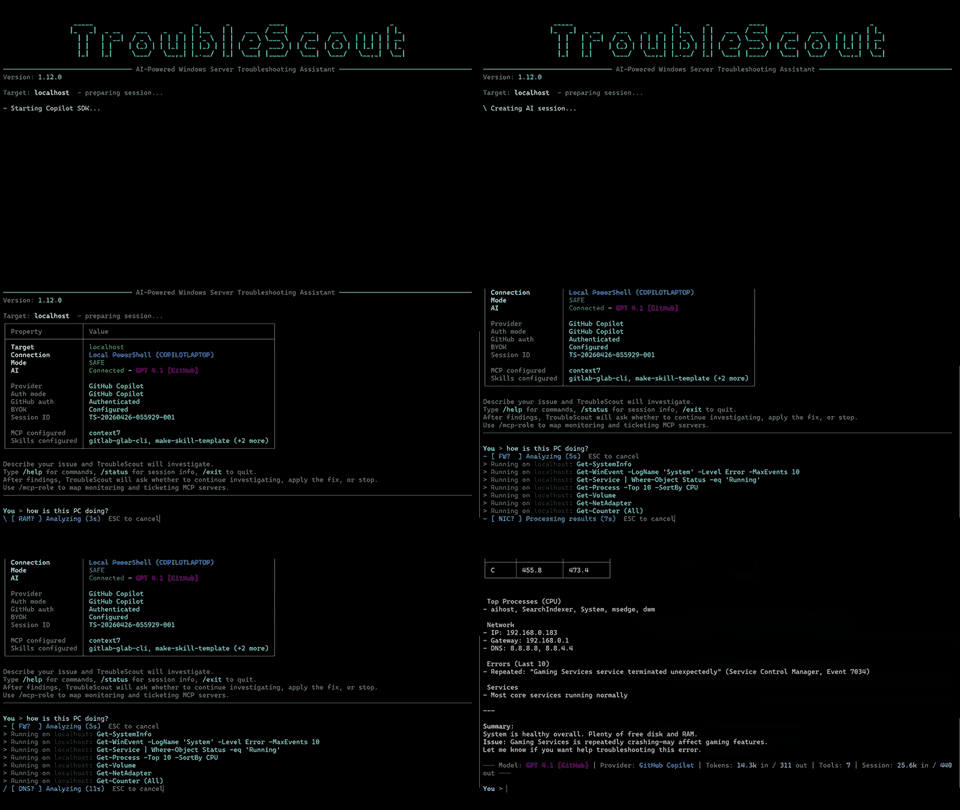
TroubleScout is a AI‑powered troubleshooting CLI for Windows. I manage Windows servers at work and always wanted an AI assistant that could deal with logs so I wouldn’t have to open Event Viewer ever again. When the Copilot SDK came out, I finally built one.
One of my first tests was on a backup server: “I’m getting high CPU alerts, what’s going on?” It calmly explained that backups were running (fair), suggested raising the alert threshold (also fair), and then added: “By the way, one of the arrays has a failing disk.” I assumed hallucination… until the real alert arrived minutes later. I filed a ticket and took a long and well deserved coffee break.
Since this is a hobby project, I also tested it at home on my Windows PCs. When I asked my gaming PC “how is the PC doing?”, TroubleScout dug up ancient ASUS services from hardware I replaced three motherboards and 10+ years ago. It explained why they were failing and asked if I wanted them removed. (It always asks first. Only read‑only stuff runs automatically. I’m lazy, not reckless.)
It started as a hobby experiment, but now I use it every day — for real server diagnostics and for keeping my personal machines tidy without any effort on my part.
Get your Windows troubleshooting done with a friendly AI sidekick that listens to plain English and runs safe PowerShell checks—perfect for sysadmins who want quick answers without the command line chaos!
Key features:
- 🤖 Natural language troubleshooting without command line hassle
- 🔒 Safe by default with read-only auto commands and approval for changes
- 🌐 Local and remote support with multi-server sessions
- 📊 Generate shareable HTML reports of your troubleshooting adventures
This summary was generated by GitHub Copilot based on the project README.