Unlock My PDF
Unlock PDFs Permanently. With just a right click ✨

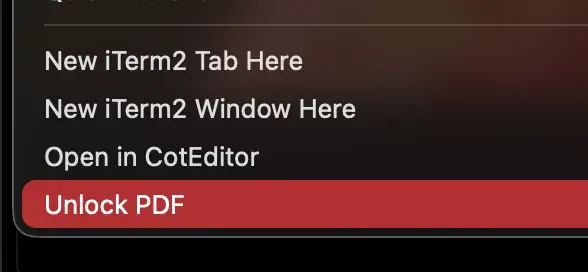
You have a PDF you own - a bank statement, a scanned form, a manual - and you cannot copy text from it, print it, or merge it with another PDF because it’s locked. Unlock My PDF is a 30-second install, free, fully-local tool that drops an Unlock PDF button into your right-click menu.
Pick a PDF —> RIght click —> Get an unlocked copy next to the original. Done.
Features
- Right-click in Finder - no terminal needed after install
- Batch support - select multiple PDFs, unlock all in one click
- Local & private - your files never leave your Mac
- Non-destructive - original is preserved; output is -unlocked.pdf
- Tiny - one shell script, one Automator Quick Action, no daemons
Online “PDF unlocker” sites want you to upload private documents to a stranger’s server. Desktop apps want $30 and a subscription.
Wave goodbye to pesky PDF restrictions with a magical right-click unlock that frees your files instantly and locally—no subscriptions, no uploads, just pure unlocked PDF bliss right from your Mac Finder!
Key features:
- ✨ Unlock PDFs with a simple right-click in Finder
- 🔒 Works fully offline to keep your files private
- 📂 Batch unlock multiple PDFs at once
- 🗃️ Non-destructive output keeps originals safe with unlocked copies
This summary was generated by GitHub Copilot based on the project README.